
Why your page is not indexed on Google and how to fix it
Page not indexed on Google? See the real causes (crawling, quality, sitemap, crawl budget) and a direct diagnostic roadmap for each case.
highlights
- The reason a page is not indexed lies in three places: no crawling, a decision not to index, or dropping out of the index after being indexed.
- Crawling and indexing are different stages: a page can be fully crawled and still stay out of the index.
- With no technical block, Google decides to index by comparing whether the page adds something the index does not have yet.
- For large sites, segment indexing problems by URL pattern instead of fixing page by page.
If your page does not show up on Google, the reason is in one of three places: Googlebot cannot reach it, it reaches it but decides not to index it (usually because of quality or duplication), or it was indexed and later dropped out of the index. The fastest way to find out which one is the URL Inspection tool in Search Console, not a generic checklist.
I have worked in SEO for almost ten years, much of it dealing with sites large enough that "just request indexing again" is not a solution. And if there is one thing I learned reviewing index coverage report after index coverage report, it is this: most guides treat indexing as a single problem, when in practice it is about five different problems with similar symptoms.
This article is the map. It explains how the indexing process really works, separates the most common causes by type, and sends you to the right guide depending on what Search Console is telling you.
How the indexing process works (quickly, no fluff)
Google goes through three stages before a page appears in a search:
- Discovery: Googlebot finds the URL, whether through a link, a sitemap, or a redirect.
- Crawling: the bot accesses the page, downloads the HTML (and runs the JavaScript, when needed), and extracts the content.
- Indexing: Google decides whether that content goes into the index, based on quality, duplication, canonical, and a series of other signals.
The most common mistake I see is treating "crawled" as a synonym for "indexed", two different stages of the process. Google can crawl your whole page and still decide it does not deserve a place in the index. That is exactly what the "Crawled - currently not indexed" status in the coverage report describes, and it is by far the most cited problem in SEO forums, ahead of anything else related to indexing.
In practice: before you start testing solutions, open Search Console, go to Pages > Not indexed, and check which status shows up for the problem URL. The status name alone rules out half the hypotheses.
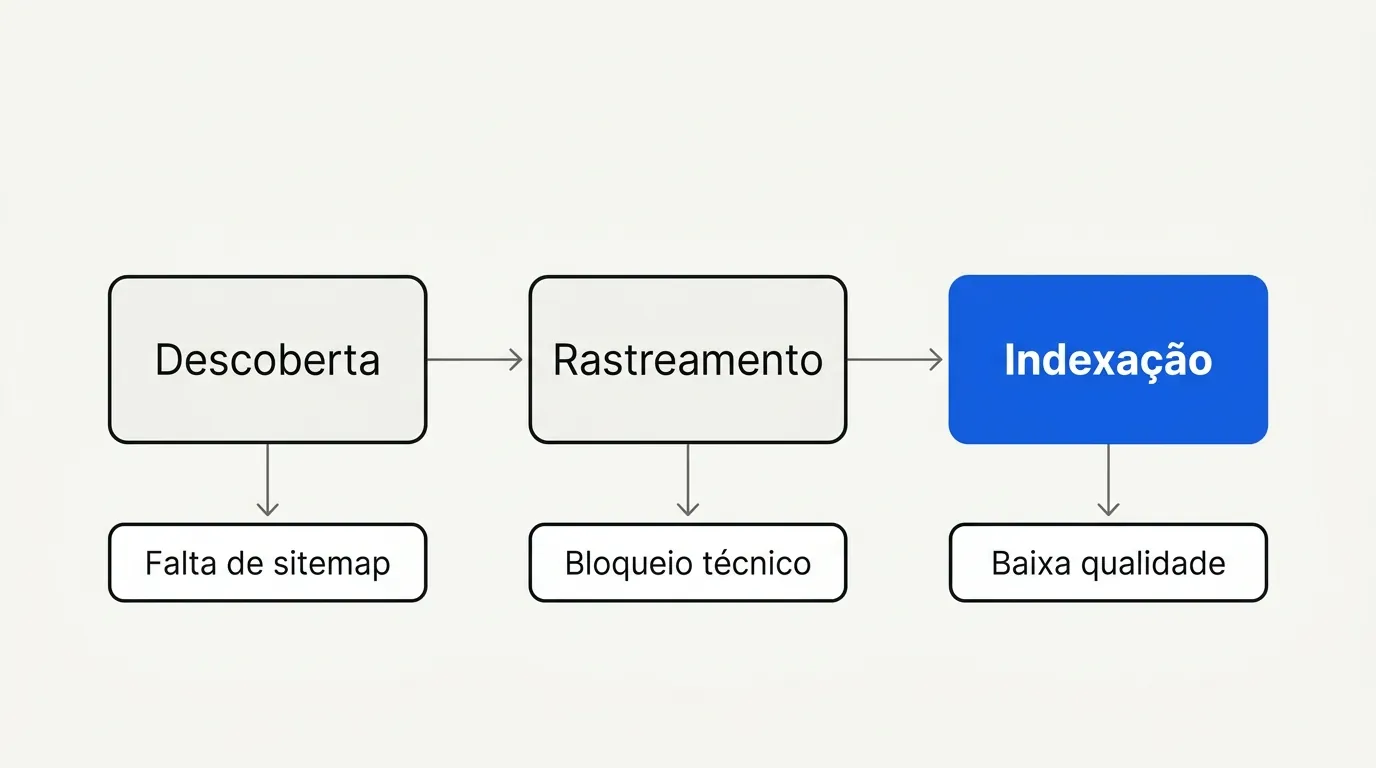
What weighs on the indexing decision, beyond technical blocks
A technical block (robots.txt, noindex, server error) is easy to diagnose because it is binary: either it is there or it is not. The harder part to explain is what happens when there is no block at all and Google still decides not to index.
In that case, Google is evaluating a set of signals in relative terms, not absolute ones. There is no minimum "quality" score that, once reached, guarantees indexing. What exists is a comparison: does that page add something the index does not have yet, for that kind of search? If the answer is no (because the content is very similar to another URL on the same site, or because it is too generic to compete with what is already indexed on the topic), Google tends to leave it out.
The signals that weigh most in this evaluation, in my experience dealing with index coverage reports:
- Real originality, not just rewriting another text with synonyms.
- Internal link depth: pages many clicks away from the homepage, with no other relevant page pointing to them, get less attention.
- Consistency of technical signals: canonical, hreflang (when applicable), and HTTP status need to tell the same story. Conflicting signals make Google hesitate.
- Past crawl behavior: a history of server errors or unstable content on the same domain reduces Googlebot's willingness to come back often.
In practice: when a page has no technical block and still does not get indexed, the first question I ask is "what does this page say that no other page, mine or a competitor's, already says better?". If the answer is "nothing", the fix is editorial.
The real causes, organized by where the problem is
I separated the causes by the stage of the process where they happen, because that is how they show up in practice: each one calls for a different diagnostic tool and, above all, a different guide to solve it. Trying to apply the "thin content" solution to a problem that is actually a robots.txt block is the most common reason someone spends weeks failing to solve something that would take a day.
1. Google never crawled the page
This happens when there is no path to the URL. With no internal link pointing to it and no sitemap, Googlebot simply does not know it exists. It is the most common cause on newly launched sites and on pages published without any planned internal linking.
Fix it with: an updated sitemap, an internal link from a page that already gets crawled often, and a manual indexing request for the one off case. If the problem keeps happening on a new site, the right guide is new site taking too long to get indexed on Google.
2. Something is blocking crawling
This covers robots.txt blocking the wrong folder, a noindex meta tag left over from a staging environment, password protection, or a firewall/WAF blocking the Googlebot user agent. This is the kind of cause that gets expensive because it goes unnoticed: I have seen reports of entire sites disappearing from the index after an accidental block of Googlebot variants that was only discovered a month later.
# Example of a common accidental block
User-agent: *
Disallow: /
A line like this left in production after migrating from a test environment is the kind of mistake that wipes out indexing for the whole site without generating any visible alert besides the gradual drop in the coverage report.
3. Google crawled it, but decided not to index
This is the most frustrating category because there is no clear "error" to fix. Typical causes are thin content or content very similar to another page on the site, a lack of relevance signals (few internal and external links pointing to that URL) and, in ecommerce, out of stock products without availability structured data.
That is the subject of the article crawled but currently not indexed: causes and fixes, where I go into detail on how to prioritize the fix when there are hundreds or thousands of URLs in the same status.
4. The page was indexed and then dropped out of the index
Unlike the previous three, here the page did show up in search at some point. The drop can be intentional (someone applied noindex or used the removals tool) or a side effect of another change: a poorly executed migration, a canonical pointing to the wrong place, a recurring server error. I covered this scenario in more depth in deindexed pages and proper URL removal.
5. Crawling is being wasted on the wrong pages
For small sites this is almost never the real problem. But on sites with tens of thousands of URLs (ecommerce with filters, portals with extensive pagination), Googlebot may be spending most of its time on low value pages and arriving late (or never) at the pages that matter. The full topic is in crawl budget and Googlebot: when it matters.
6. Google is not finding or prioritizing the sitemap
The sitemap works as the most direct signal you give Google about which URLs exist and deserve attention, without guaranteeing indexing. Common errors include a sitemap index with only one of the files being read, a "couldn't fetch" status, and URLs with a protocol or domain different from the one declared as canonical. I wrapped up the topic in sitemaps: what Google reads and what it ignores.
The diagnosis I actually use
When a client comes in with "my pages are not getting indexed", this is the roadmap, in this order:
- Confirm the problem is real. Run
site:dominio.com/url-especifica. If it shows up, the problem may just be perception (the page exists but does not rank well) and not indexing. - Check URL Inspection in Search Console for that specific URL. The status there is more reliable than the aggregate report, which lags.
- Look at robots.txt and the
robotstag on the page itself (Ctrl+U in the browser, search for "noindex" and "disallow"). - Check whether there is a canonical pointing to another URL. A misconfigured canonical makes Google treat your page as a duplicate of another.
- Evaluate quality signals and internal links. Orphan pages (no internal links at all) and content very similar to another URL on the site are the two causes that show up most once technical blocks are ruled out.
- If it is volume (hundreds or thousands of URLs in the same status), segment by URL pattern before trying to fix them one by one. Problems at scale call for solutions at scale.
| Symptom in Search Console | Most likely cause | Where to go deeper |
|---|---|---|
| Not found / not crawled | Missing internal link or sitemap | New site taking too long to get indexed |
| Blocked by robots.txt | Overly generic Disallow | Review robots.txt directly |
| Crawled - currently not indexed | Quality, duplication, lack of internal authority | Crawled but not indexed |
| Page with redirect | Canonical or link pointing to old URL | Deindexed pages and URL removal |
| Indexed before, gone now | Intentional removal or side effect of a change | Deindexed pages and URL removal |
| Sitemap "couldn't fetch" | Formatting error or file access error | Sitemaps: best practices |
| Symptom in Search Console | Type of cause | Where to go deeper |
|---|---|---|
| Not found / not crawled | Technical (discovery) | New site taking too long to get indexed |
| Blocked by robots.txt | Technical (block) | Review robots.txt directly |
| Crawled - currently not indexed | Quality and content | Crawled but not indexed |
| Page with redirect | Technical (canonical or link) | Deindexed pages and URL removal |
| Indexed before, gone now | Technical or intentional | Deindexed pages and URL removal |
| Sitemap "couldn't fetch" | Technical (sitemap) | Sitemaps: best practices |
Diagnosing at scale: beyond the standard Search Console report
The Search Console interface is enough for a handful of URLs. For large sites, it gets shallow fast: the coverage report aggregates by status, but does not easily cross with template, category, or publication date. Some ways to go further:
- Export the data via the Search Console API instead of only looking at the interface. This lets you cross indexing status with other tables (traffic, category, date) in a spreadsheet or an analysis tool.
- Cross the coverage report with the sitemap, separating URLs that are in the sitemap but not indexed from those that never made it into the sitemap. They are two different problems with different causes.
- Analyze server logs to see Googlebot's real visit frequency by URL pattern. This is covered in detail in the crawl budget guide, but it is worth a first check whenever the volume of non indexed pages is large.
- Compare publication dates with first indexing dates (when available) to see whether the delay is widespread or concentrated in a specific period, which usually points to a technical change made at that time.
What Reddit shows that SEO guides tend to hide
Going through English language SEO forums, the pattern that stands out most is the scale of the problem for large sites, more than the technical cause itself. There are people reporting tens of thousands of URLs stuck in "Discovered - currently not indexed" for months, 11 million page sites where nobody knows where to start, and migrations in which 90% of the domain vanishes from the index for more than ten months.
That changes the right answer. For a blog with 50 posts, the advice to "improve content quality and request manual indexing" usually works. For an ecommerce catalog with 200 thousand URLs, that answer is useless: the problem is structural (category architecture, crawl budget, duplication across product variations), and requesting manual indexing page by page does not scale.
In practice: if you are dealing with more than a few hundred URLs in the same status, stop trying to fix them individually. Group by URL pattern (category, template, click depth from the homepage) and go after the root cause of that group.
Indexing and AI crawlers: one more layer
A quick aside: the indexing conversation changed a bit with the arrival of crawlers from AI tools (for training and for real time answers). They do not follow exactly the same rules as Googlebot, and robots.txt decisions made with only Google in mind may be blocking or allowing these bots without you noticing. This is outside the scope of this guide, but if you touch robots.txt to solve indexing, it is worth also reviewing the directives specific to AI bots before publishing the change.
Frequently asked questions
No. Crawling is Googlebot accessing and reading the page. Indexing is the decision to store that content in the index so it can possibly appear in searches. A page can be crawled without ever being indexed.
If I had to pick a starting point, I would open the coverage report in Search Console and see which status concentrates the most problem URLs. That status says a lot more than the impression that "Google does not like my site", and it points to which of the five guides above solves your case.

Lucas Cassapula
Partner & Head of SEO at Wesearch and Co-founder of Mentionflow
I am a partner at Wesearch and co-founder of Mentionflow. I have worked with SEO for almost 10 years. I am a data-driven geek who is always testing hypotheses, looking for patterns and turning ideas into products. I share studies, experiments and automations focused on SEO and GEO.