
Deindexed pages and proper URL removal
Pages vanishing from Google's index for no apparent reason, or need to remove URLs on purpose? See the causes, the right methods, and when to use each one.
highlights
- Removing a URL on purpose and a page leaving the index on its own are different problems that call for different tools.
- Robots.txt does not remove a page from the index, it only prevents future crawling; use noindex, 404/410, or the removals tool.
- Recurring server errors, unintended canonical changes, and poorly executed migrations are the most common causes of an unintended index drop.
- Before investigating any other hypothesis, check the manual actions tab in Search Console to rule out a penalty.
There are two completely different scenarios under the umbrella of "deindexed page": you want to remove a URL on purpose (sensitive data, old page, duplicate content) or your pages are leaving the index on their own, without you asking for it. The right method depends on which of the two is your case, and mixing them up is the most common cause of botched removals.
A good share of the reports I see in SEO forums revolve around "why did my index drop from 7 thousand to 2 thousand pages when I did nothing", a problem quite different from simply removing a URL on purpose. They are different problems. This guide covers both, because the wrong diagnosis leads to the wrong tool.
Scenario 1: you want to remove a URL on purpose
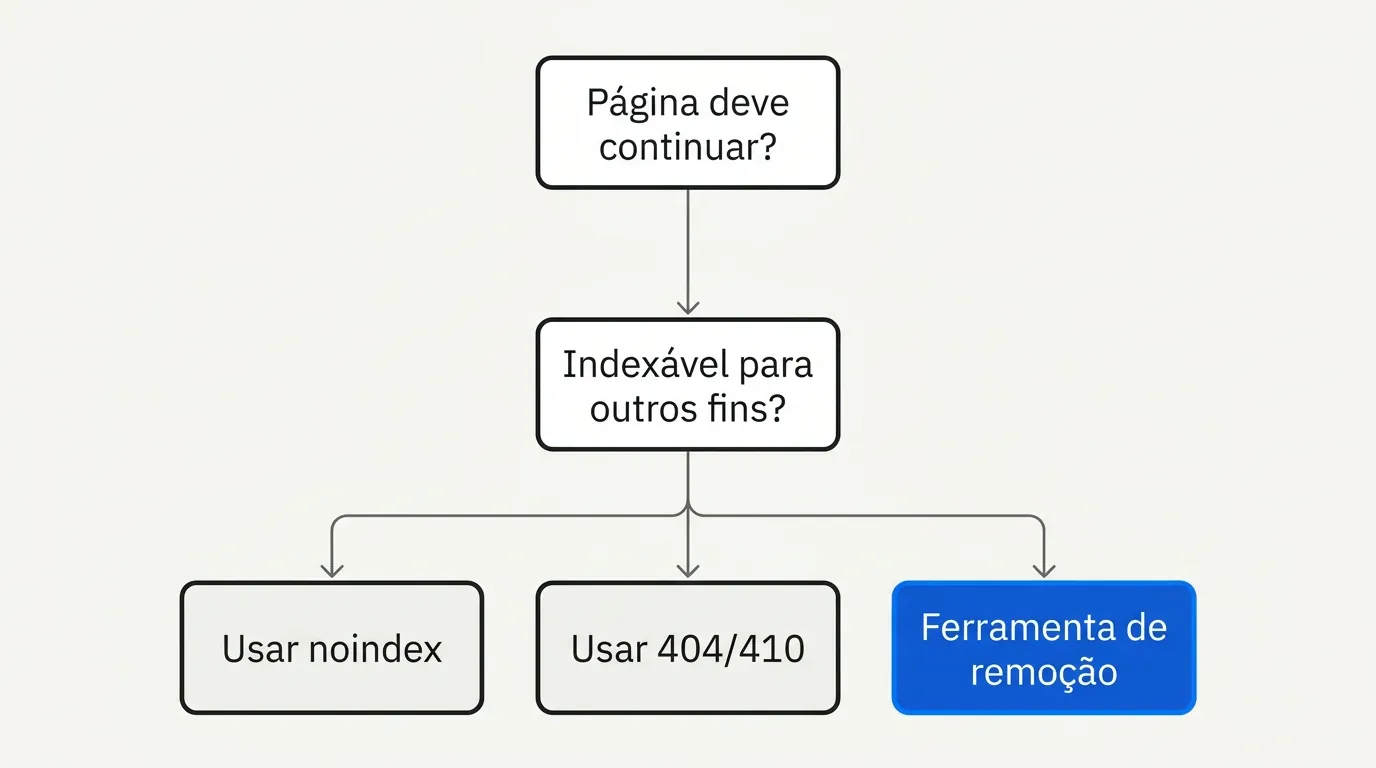
The methods, and when to use each one
| Method | Speed | Duration | When to use |
|---|---|---|---|
| Search Console removals tool | Fast (about 1 day) | Temporary, usually up to 6 months | Emergency: sensitive content, URL published by mistake |
noindex meta tag | Depends on the next crawl | Permanent, as long as the tag exists | Page that should stay live, but out of search |
| HTTP 404 or 410 code | Depends on the next crawl | Permanent | Content that truly no longer exists |
| Robots.txt (Disallow) | Does not remove from the index | N/A | Do not use it to deindex. It only prevents future crawling; an already indexed page may keep showing up without a snippet |
The most repeated mistake here is using robots.txt expecting it to remove the page from the index. It does not. If Google has already indexed the URL, blocking crawling via robots.txt only stops it from seeing future updates, including any noindex tag you add later. To truly remove it, the page needs to stay crawlable until Google processes the removal signal (noindex, 404, or the removals tool).
In practice: if the URL is already indexed and you want it out, the right order is: leave crawling open, add
noindex(or serve 404/410 if the content really no longer exists), and only use the Search Console removals tool to speed things up in urgent cases.
Bulk removal
To remove many URLs at once (an entire folder, for example), the most reliable path is still combining noindex at scale (by template or server rule) with a temporary sitemap specific to those URLs, to speed up crawling and the application of the tag. The Search Console removals tool accepts URL prefixes, but remember: it is temporary.
Scenario 2: pages leaving the index on their own
This is the scenario that shows up most as an "urgent problem" on Reddit: the index dropping from thousands to hundreds of pages without any deliberate action, constant indexing fluctuations in large catalogs, sites banned with no apparent warning.
The most common causes:
- Recurring server errors (5xx). If Googlebot repeatedly hits a server error on a URL, it tends to remove it from the index until the page responds consistently again.
- Unintended canonical change. A template update that started pointing the canonical of many pages to a single URL (the homepage, for example) makes Google treat the others as duplicates and drop them from the index.
- Content that became thinner or duplicated after a site redesign.
- Penalty or manual action. Rarer, but it needs to be ruled out: check the "Manual actions" tab in Search Console before any other hypothesis.
- Poorly executed migration, with missing or incorrect redirects between the old and the new structure.
In practice: when the index drops suddenly and sharply, the first question is "what changed without me noticing": a recent deploy, a CMS update, a server or CDN change, an expired SSL certificate.
Constant fluctuation: when the number goes up and down nonstop
Unlike a single, definitive drop, some sites report a sawtooth pattern: the number of indexed pages rises, falls, rises again, in cycles of weeks. This usually means Google is repeatedly reassessing the same batch of URLs and reaching different conclusions on each crawl, which normally points to:
- Content that changes inconsistently between crawls (for example, product availability that switches on and off, or a dynamically generated content block that varies).
- Unstable infrastructure, such as a CDN or load balancer that occasionally serves a different version of the page (an error, an empty page, or content in another language) depending on which server handles the request.
- A/B tests or personalization that change the content Googlebot sees in an uncontrolled way.
For sites in this scenario, the useful diagnosis is to compare the HTML served to Googlebot on different days (using URL Inspection itself, which shows the rendered HTML) and look for inconsistency, instead of looking at a single crawl.
How to investigate an unintended index drop
- Confirm the drop in the Search Console indexed pages report (do not rely only on
site:, which is approximate). - Check the "Manual actions" and "Security issues" tabs first, to rule out a penalty.
- Compare the list of URLs that left the index with the history of deploys or site changes in the same period.
- Check server status (response codes) for the affected URLs using URL Inspection.
- See whether the canonical of those pages changed.
If the traffic drop that comes with the deindexing seems larger or broader than this, it is also worth looking at the general traffic drop scenario, which has its own diagnosis.
Frequently asked questions
No. It only prevents future crawling. An already indexed page may keep showing up, sometimes without a snippet, even when blocked by robots.txt.
When the removal is intentional, choose the method from the table above for durability, not speed. When the drop is unexpected, I would look at the manual actions tab in Search Console before any other hypothesis. For the full diagnosis, see the guide to Google indexing.

Lucas Cassapula
Partner & Head of SEO at Wesearch and Co-founder of Mentionflow
I am a partner at Wesearch and co-founder of Mentionflow. I have worked with SEO for almost 10 years. I am a data-driven geek who is always testing hypotheses, looking for patterns and turning ideas into products. I share studies, experiments and automations focused on SEO and GEO.