
Crawl budget and Googlebot: when it matters
Crawl budget only truly matters for large sites. Understand the concept, how to spot real crawl waste, and when it is worth acting.
highlights
- Crawl budget is usually only a real factor for large sites, with thousands of URLs or more.
- Low value crawling, such as orphan pages and filters, tends to consume budget that should go to revenue pages.
- Large, sudden site expansions can drop the crawl rate if the infrastructure does not keep up before launch.
- Analyze at least two weeks of server logs before any optimization, to separate real crawling from theory.
Crawl budget is the number of pages Googlebot is willing and able to crawl on your site within a period. For most small sites, it never becomes a real problem. It starts to matter when the volume of URLs is large enough that Googlebot cannot (or does not prioritize) go through all of them as often as needed.
I see crawl budget cited as the explanation for almost any indexing problem, including on sites with two hundred pages, where it is almost never the real factor. So before anything else: if your site is small and pages simply do not get indexed, the problem is probably quality, duplication, or a technical block, even if crawl budget looks like the simpler explanation. See the general indexing guide to rule out those causes first.
That said, for large sites (ecommerce with thousands of SKUs, news portals, directories with extensive pagination), crawl budget is real and has a direct impact on which pages get discovered and kept up to date in the index.
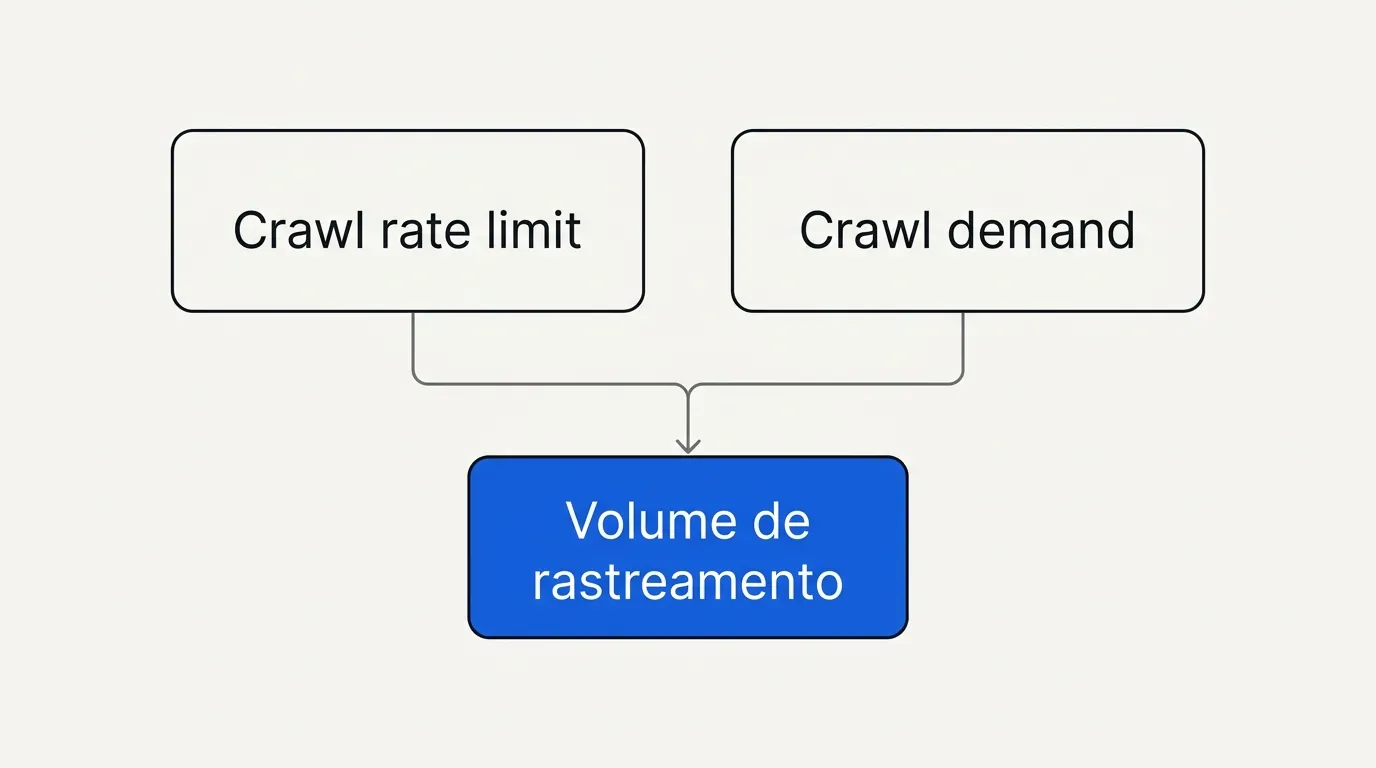
The two components of crawl budget
- Crawl rate limit: how much Googlebot can hit your server without overloading it. If the server responds slowly or returns errors under load, Google lowers the visit frequency so it does not make things worse.
- Crawl demand: how much Google wants to crawl your site, based on popularity, update frequency, and the perceived relevance of the pages.
Together they define how many URLs, on average, Googlebot will visit on your domain in a period. A slow, unstable site has the first component reduced; a site with rarely updated content and little external relevance has the second reduced. The two effects add up.
Where crawl budget gets wasted (real cases)
The most consistent reports in SEO forums about crawl budget follow a pattern: crawling happens, but it is poorly distributed.
- Orphan and low value pages consuming crawling that should go to revenue pages. A common report is Googlebot crawling internal search pages or irrelevant filters more often than product pages.
- Parameterized URLs multiplying. Ecommerce filters (color, size, sorting) generating almost endless URL combinations, each one crawlable and each one competing for the same crawl budget.
- Listing the same item in several categories, multiplying URLs for the same content.
- Redirect chains and 5xx errors consuming crawl attempts without producing any indexing value.
- Large, sudden site expansions (tripling the number of pages at once) without infrastructure or relevance signals keeping up, which can drop the crawl rate for the rest of the site.
In practice: before any optimization, I download at least two weeks of server logs and separate what Googlebot is crawling from what actually matters for traffic. In most "bad crawl budget" cases, the answer shows up there, not in theory.
How to read a crawl log, in short
- Filter requests by the Googlebot user agent (and confirm by IP that they are legitimate hits, not spoofing).
- Group by URL pattern (template, folder, parameter).
- Compare the crawl volume of each group with the organic traffic or revenue it generates.
- Groups with high crawling and low value are candidates for blocking, consolidation, or
noindex. - Groups with high value and low crawling are where it pays to reinforce internal linking and sitemap presence.
# Example of blocking sort/filter parameters that add no indexing value
User-agent: Googlebot
Disallow: /*?ordenar=
Disallow: /*?cor=
How to optimize crawl budget in practice
- Consolidate duplicate URLs with a correct canonical before thinking about blocking via robots.txt.
- Fix redirect chains, pointing straight to the final destination.
- Solve recurring server errors before any other optimization; they reduce the crawl rate limit for the whole site, not just for the URL with the error.
- Use robots.txt to block very low value areas (internal search, certain parameters), but avoid blocking what still needs to be indexed.
- Keep the sitemap lean and up to date, including only URLs that should actually be indexed. More in sitemaps: what Google reads and what it ignores.
- Monitor server speed. Load times above a few seconds weigh against the crawl rate; Google has publicly tied high load times to higher user abandonment, according to a study published by Think with Google.
The specific case of sites that grow too fast
A pattern that shows up often in SEO reports is the site that triples (or more) its number of pages at once, whether by launching a new catalog or by automatically generating content at scale, and sees the crawl rate for the rest of the site plunge soon after.
The explanation is that the crawl rate limit does not scale automatically with site size. If the infrastructure is not reinforced before the expansion (server capacity, cache, response time), Google may lower crawl frequency exactly when more pages need to be discovered, creating a bottleneck that takes weeks to resolve on its own.
When a large expansion is planned, it is worth:
- Testing server capacity under simulated load before launch, not after.
- Launching in batches, when possible, instead of publishing the whole new volume at once.
- Making sure the new pages have internal linking from day one, not as a later adjustment.
- Following the Search Console crawl stats report closely in the weeks after launch, to catch any sign of degradation early.
In practice: when a client plans to multiply the number of pages on the site, the first question I ask is about infrastructure, before any content: can the server handle the additional crawl volume without degrading the response time of the whole site?
When crawl budget becomes the wrong explanation
If your site has fewer than a few hundred pages, the chance that Googlebot simply "does not have time" to crawl everything is very low. In those cases, insisting on the crawl budget hypothesis usually distracts from the real cause, which is normally in crawled but not indexed or in a technical block.
Frequently asked questions
No. For small and medium sites, it is rarely a limiting factor. It is relevant mainly for sites with tens of thousands of URLs or more.
If I suspected crawl budget on a large site, before touching robots.txt I would pull two weeks of server logs and split crawling by page value. That data shows where it is worth cutting. The overall diagnostic picture is in the guide to Google indexing.

Lucas Cassapula
Partner & Head of SEO at Wesearch and Co-founder of Mentionflow
I am a partner at Wesearch and co-founder of Mentionflow. I have worked with SEO for almost 10 years. I am a data-driven geek who is always testing hypotheses, looking for patterns and turning ideas into products. I share studies, experiments and automations focused on SEO and GEO.