
Sitemaps: what Google reads and what it ignores
An XML sitemap is a discovery map for Google with no role as a ranking factor. See what Google actually uses, what it ignores, and the most common errors to fix.
highlights
- An XML sitemap works as a discovery map for Google, without being a ranking factor.
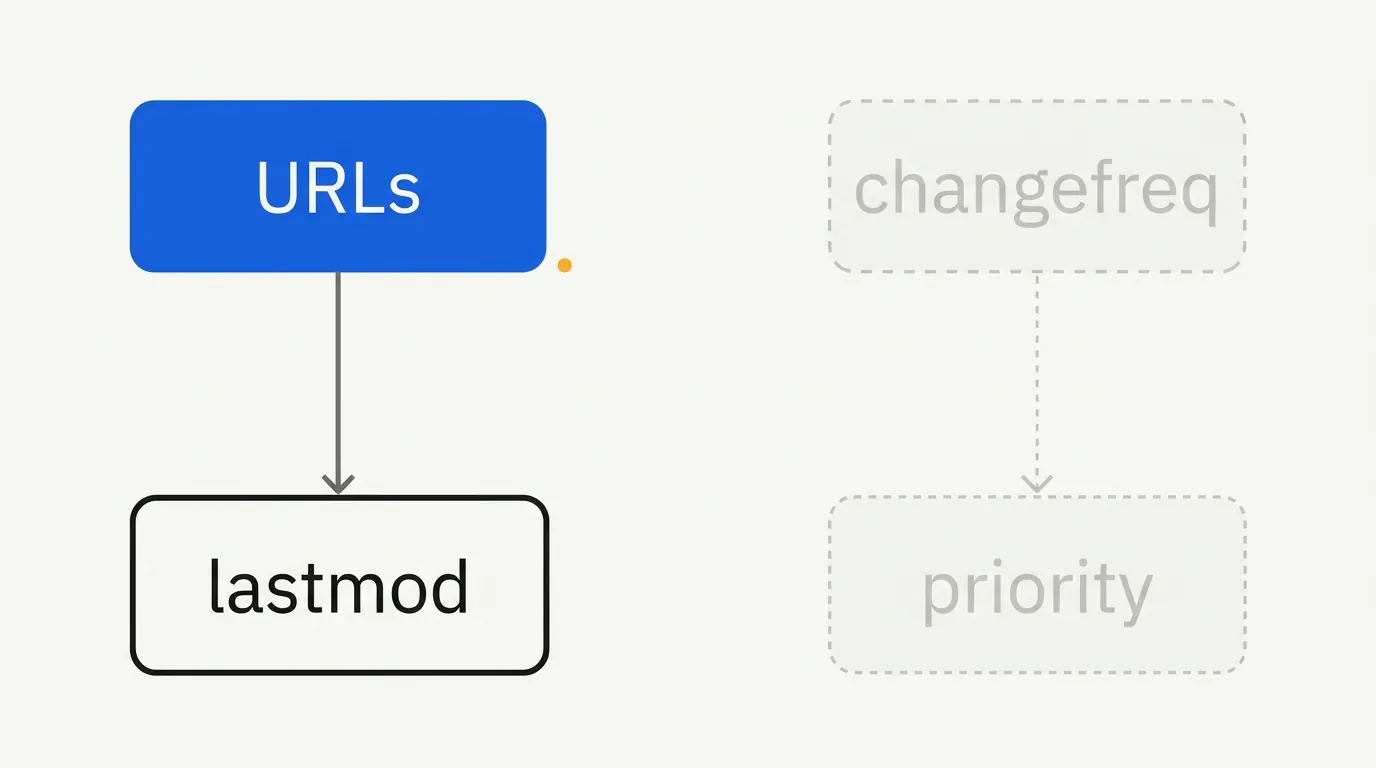
- Google uses the list of URLs and, with caveats, the modification date, but ignores declared changefreq and priority.
- Leave out of the sitemap URLs with parameters, pages with noindex, redirects, errors, and non canonical versions.
- Good internal link architecture is still necessary even with a complete sitemap; pages without internal links tend to be treated as less relevant.
An XML sitemap works as a map you hand to Google showing which URLs exist and deserve attention, without being a ranking factor or a guarantee of indexing. Google uses part of its information (the list of URLs and, with caveats, the modification date) and ignores other parts (declared priority and update frequency).
Much of the confusion about sitemaps comes from treating them as a magic indexing tool, when in practice they are a discovery signal, useful mainly when the site is large or has pages with few internal links. But implementation errors are common enough to show up every week in SEO forums: a sitemap index where only one of the files is read, a "couldn't fetch" error, and conflicts between the www and non www versions declared.
What Google actually uses from your sitemap
- The list of URLs, yes, with higher discovery priority for large sites or sites with weak internal link architecture.
- The
lastmodtag, as long as it is consistent and reliable. If Google notices the date changes without the content really changing, it starts to distrust the tag and give it less weight.
What Google ignores, according to Google's own official developer documentation:
changefreq(declared update frequency): Google prefers to observe the real pattern of changes over time rather than trust a static declaration.priority(relative priority from 0.0 to 1.0): more reliable signals, such as internal links and observed update patterns, weigh much more than this self declared value.
In practice: do not waste time calibrating
priorityorchangefreqvalues down to the millimeter. Put the energy into making sure the sitemap's list of URLs is clean, up to date, and free of junk.
Minimum structure of a sitemap
<?xml version="1.0" encoding="UTF-8"?>
<urlset xmlns="http://www.sitemaps.org/schemas/sitemap/0.9">
  <url>
    <loc>https://exemplo.com.br/pagina-exemplo</loc>
    <lastmod>2026-10-15</lastmod>
  </url>
</urlset>
For large sites, the main sitemap is usually an index that points to several smaller files:
<?xml version="1.0" encoding="UTF-8"?>
<sitemapindex xmlns="http://www.sitemaps.org/schemas/sitemap/0.9">
  <sitemap>
    <loc>https://exemplo.com.br/sitemap-produtos.xml</loc>
  </sitemap>
  <sitemap>
    <loc>https://exemplo.com.br/sitemap-blog.xml</loc>
  </sitemap>
</sitemapindex>
The technical limit per file is 50 thousand URLs or 50 MB (whichever comes first), according to the sitemaps.org protocol and Google's documentation. For sites larger than that, a sitemap index is mandatory.
What to include and what to exclude
Include:
- Canonical, indexable URLs: homepage, relevant category and product pages, published blog posts.
Exclude:
- URLs with parameters (filters, sorting, session).
- Pages with
noindex. - URLs that redirect (301/302) or return errors (404, 5xx).
- Non canonical versions (http when the canonical is https, with "www" when the canonical is without "www", and vice versa).
That last point is the most common cause of the "Google Search Console only reads the www version" error or similar situations: the sitemap declares URLs on a domain version different from the one configured as canonical on the site, and Google treats it as an inconsistency.
The most common errors (and how to fix them)
Sitemap index where only one file is read
This happens when the sitemap index is badly formatted (for example, with <loc> pointing to a relative path instead of an absolute one) or when one of the inner files returns an HTTP error. Check each file in the index individually through its direct URL in the browser before resubmitting.
"Couldn't fetch"
It is usually one of three problems: the file is not publicly accessible (blocked by robots.txt, authentication, or a firewall), the content type returned is not valid XML, or the server took too long to respond to Google's request. Test the sitemap URL directly, logged out, to reproduce what Googlebot sees.
www vs non www conflict
If the sitemap lists URLs with "www" but the site redirects everything to the version without "www" (or the other way around), Search Console may reject or underuse the file. The rule is simple: the domain used in the sitemap must be exactly the canonical one declared on the site.
Outdated sitemap after a migration
After a domain or URL migration, an old sitemap "forgotten" in production can show up again in Search Console, confusing the diagnosis. Remove or replace old sitemaps explicitly; do not just stop referencing them.
Special sitemaps: image, video, and news
Besides the standard page sitemap, there are specific extensions that are worth it for certain kinds of sites:
- Image sitemap: useful for sites that depend on image search traffic (fashion, home decor, recipes), letting you declare several images per URL.
- Video sitemap: relevant when video is a central part of the content, beyond being a decorative element of the page.
- News sitemap: has its own rules, including a short validity window (articles up to 48 hours old), and is the format expected by Google's news products.
For most content and ecommerce sites, the standard page sitemap already covers the essentials. The extensions pay off when that type of media is a relevant traffic source in its own right, beyond a visual complement.
Sitemap and robots.txt
It is worth declaring the sitemap location in robots.txt, in addition to submitting it through Search Console:
Sitemap: https://exemplo.com.br/sitemap.xml
This helps other crawlers (not only Googlebot) find the file without depending on you registering it manually in each webmaster tool.
A sitemap does not replace good link architecture
It is worth reinforcing a point that often causes confusion: having a complete, correct sitemap does not remove the need for a good internal link structure. The sitemap helps with initial discovery, but Google keeps using the site's link architecture as a signal of relative importance between pages. A URL that only exists in the sitemap, with no internal link pointing to it, tends to be treated as less relevant than a URL reachable within a few clicks from the homepage, even if both are listed the same way in the XML file.
This is especially relevant for large sites that try to "solve" indexing just by putting everything in the sitemap, without reviewing navigation. It works up to a point, but it does not replace the work of making sure important pages are a few clicks away from where crawling is most intense.
Frequently asked questions
Not directly. It helps with discovery and crawl prioritization; it is not a ranking factor.
The quickest test I would run is to open the sitemap through its public URL, logged out, and check that it loads as valid XML with the URLs on the same domain version the site uses as canonical. That alone rules out the most common cause of sitemap errors in Search Console. For other indexing problems, see the guide to Google indexing.

Lucas Cassapula
Partner & Head of SEO at Wesearch and Co-founder of Mentionflow
I am a partner at Wesearch and co-founder of Mentionflow. I have worked with SEO for almost 10 years. I am a data-driven geek who is always testing hypotheses, looking for patterns and turning ideas into products. I share studies, experiments and automations focused on SEO and GEO.